
Cloning

Copy a WordPress site onto another, in a few minutes

Pick a full backup, pick the destination site and confirm. Tendfolio copies content, plugins, themes and users, fixes addresses and the table prefix and, if something goes wrong, puts the destination back as it was.

When it helps

Three jobs you no longer start from scratch

A new site from a template

Keep a template site with the theme, plugins and settings you always use: every new site starts there instead of from an empty WordPress.

A copy to try things on

Copy the client’s site onto a test site and try updates, a new theme or a plugin there, with no risk to the real one.

The rebuilt site, in its place

Built the new site on a work address? Clone it onto the old one: the client finds it at the usual address, and the old one stays in a backup.
How it works

Four steps, all from the panel

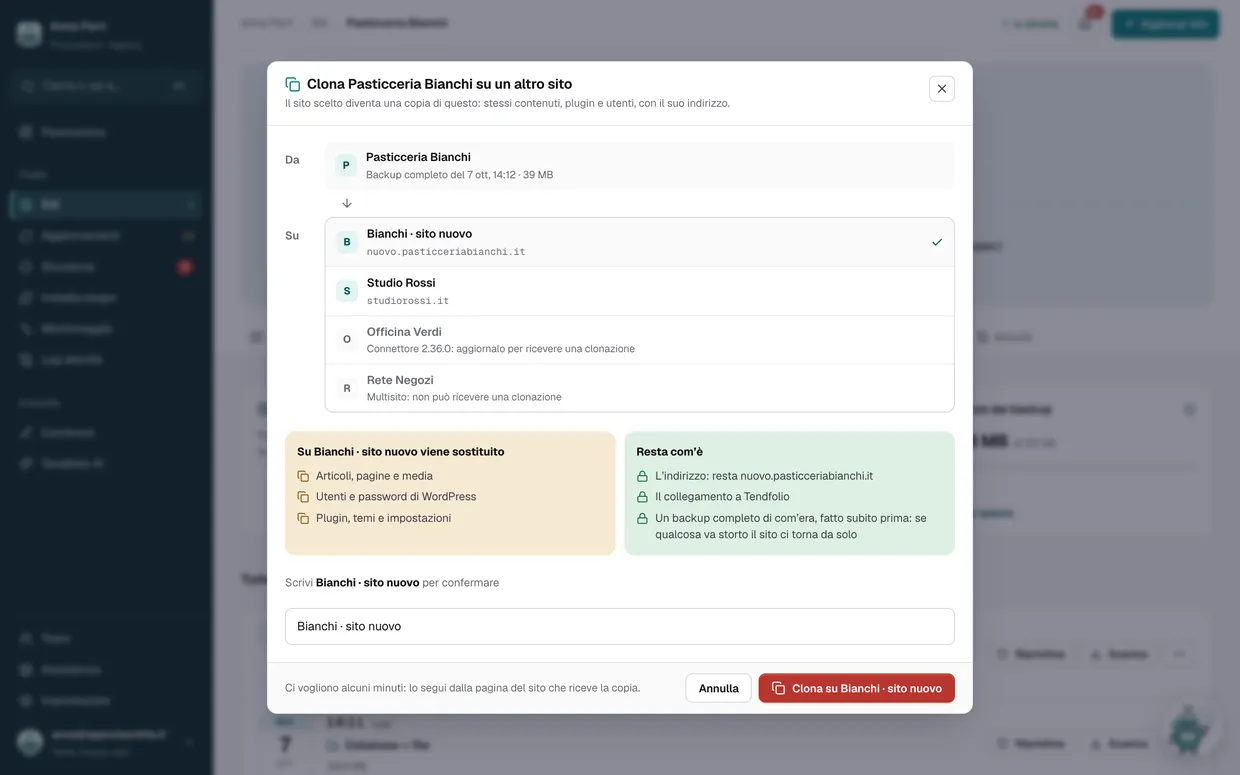
  1. A full backupOf the site to copy, with database and files. If you don’t have a recent one, make it from its Backup tab.
  2. The destinationAnother site you manage with Tendfolio, even a freshly installed WordPress. Sites that can’t be chosen say why.
  3. The name, to confirmSee what gets replaced and what stays, and type the destination’s name: no accidental clicks.
  4. A few minutesFollow the progress from the destination’s page; at the end the activity log says what was done.
The panel’s «Clone onto another site» window: the starting backup, the chosen site, what gets replaced and what stays
Done for you

The things you’d get wrong by hand, we fix

Copying the files is easy. The hard part is everything inside the database that still says «I’m the other site».

  • Addresses, everywhereThe old address becomes the new one in posts, settings and widgets, with and without https.
  • Serialized data tooWordPress options and page-builder JSON like Elementor’s are updated without breaking.
  • Different prefixeswp_ on one side, tfx_ on the other: tables and user permissions adapt to the destination.
  • Users and connectionUsers arrive with their passwords; the destination’s connection to Tendfolio stays as it is.
If something goes wrong

Before touching the destination, we copy it

The source site is never touched: the copy starts from its backup.
  1. Full backup of the destinationDatabase and files, taken by Tendfolio just before. If a passing error interrupts it, it retries on its own.
  2. If the backup fails, nothing startsThe destination stays as it was and you get an alert with the reason.
  3. If something breaks halfway, it goes back on its ownFiles and database are put back as they were, and the activity log says where it stopped.
  4. And if you change your mind laterThe backup from before stays in the list like the others: restore it whenever you like.
What you need

Before you start

  • Any Tendfolio plan, Free included: cloning uses backups, which every plan has.
  • On the site receiving the copy, Tendfolio connector 2.39 or later, which you update from the panel. The source site works with any version.
  • Two single WordPress sites: multisite installs can’t be cloned.
  • If you work in a team, permission to restore backups and access to both sites.
Questions

Common questions about cloning

Is the source site touched?

No. Tendfolio starts from one of its full backups already saved: nothing is written on the source site, and its visitors notice nothing.

Does the destination change address?

No. It keeps its address and stays connected to Tendfolio: it’s the copied content that takes its address in place of the source’s.

Do the destination’s users stay?

No: they’re replaced by the source’s, with their passwords. The accounts that were there before stay in the backup taken just before the clone.

How long does it take?

For a site of a few hundred megabytes, a few minutes. The work runs on our servers: you can close the page and come back; the outcome stays in the activity log and, if something goes wrong, you get an alert.

Can I clone a site that isn’t connected to Tendfolio?

The source needs a full backup made with Tendfolio, so it has to be connected; the destination has to be connected and responding. Connecting a site means installing the connector and pasting a code: a couple of minutes.

The Tendfolio mascot celebrating

Start free, 3 sites included

The free plan doesn’t ask for a card. Connect your first sites in a few minutes; the paid plans come with a 14-day free trial.

Clone a WordPress site onto another, from the panel · Tendfolio